Pinterest Video Downloader
Pinterest Video Download
Our Pinterest video downloader tools are a great way to download pinterest videos without providing login credentials. We also provide pinterest image, story, gif downloading 100% freely. We design pinterest downloader tool for you which helps you to download pinterest video and photos in a simpler way, just copy and paste the URL to download the pinterest video.
Pinterest is one of the most popular social media platforms which allow the user to upload Images, video, and gifs. Pinterest has a really great feature for the user because it also has a great visual search engine for searches of any kind of video, photo, and image for your ideas and projects. Pinterest has pins and boards where you create your pins and organize them easily.
Pinterest is the exciting visual social media platform where you post photos, videos, images, stories, gifs like any other social media platform and you find easily visual content anything related to your interest. On Pinterest users also upload any content and hyperlink them and link sharing that thing makes Pinterest special.
We are excited to announce that InDown is now offering Pinterest video downloading freely. Our pinterest video downloader is a free, fast, and secure tool for downloading any Pinterest video, photo, gif, and image.
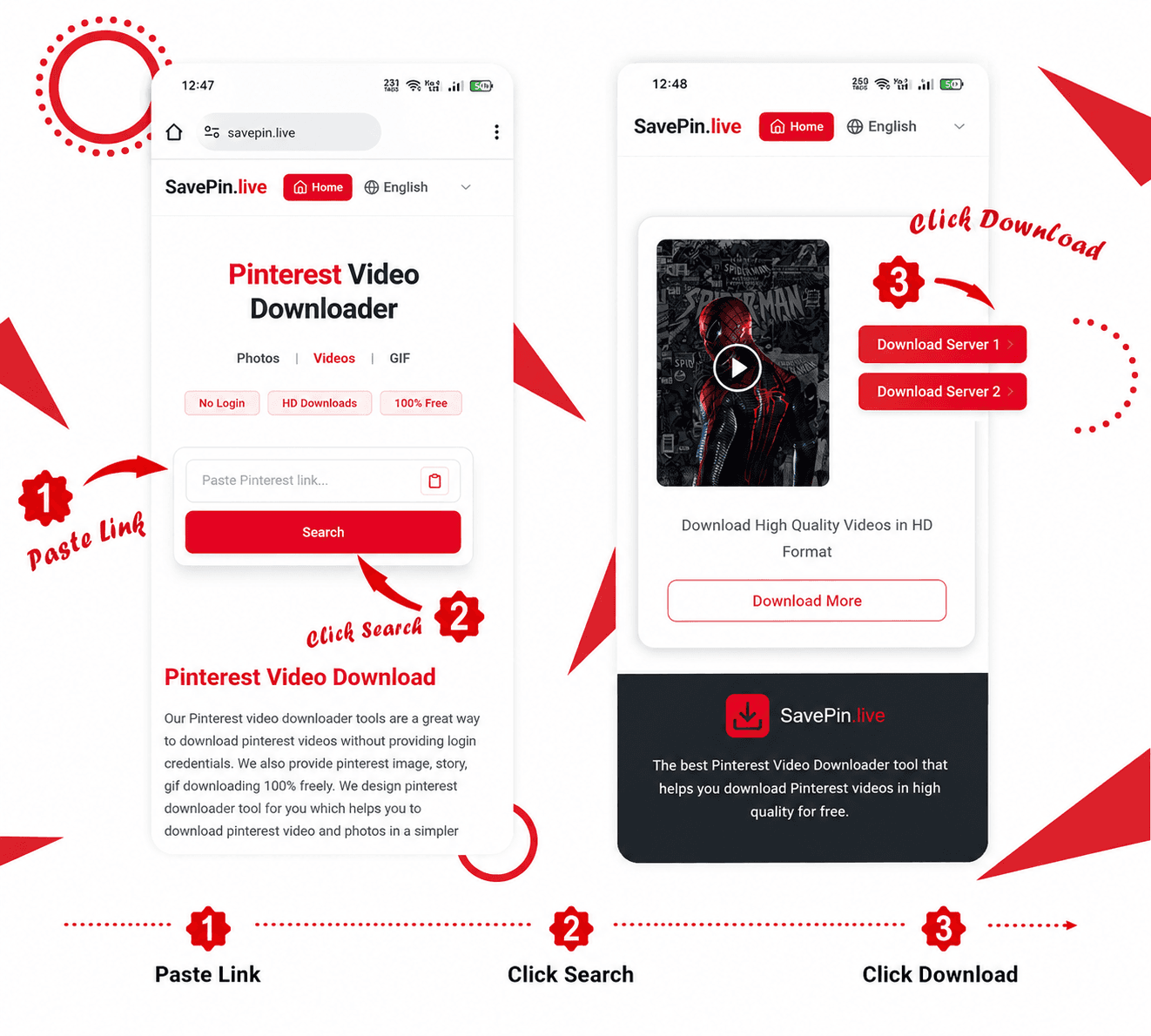
For pinterest video download you have to just copy the link and paste it inside the InDown search box and hit the download button our server automatically syncs that URL and server your Pinterest video, photo, gif & story download.
How to copy link for download Pinterest Video
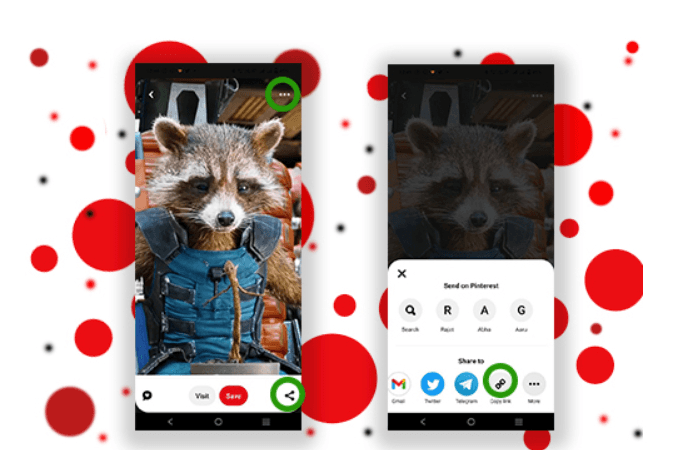
There are two ways to copy links for any type of Pinterest Video, Photo, Gif.
Way 1: From Browse Section
- 1. Open Your Pinterest App
- 2. Choose any photo, video, or gif and click on it.
- 3. See at the bottom side the share icon is shown to you.
- 4. Click on it and choose copy link option. Yup! Linked Copied
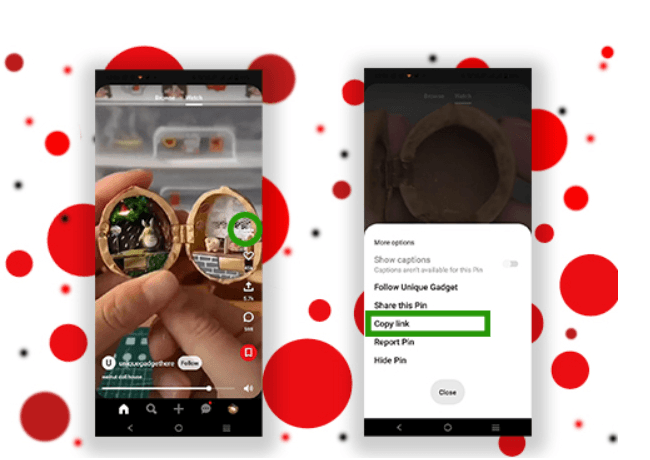
Way 2: From Watch Section
- 1. Open any Video which you want to Download
- 2. Click on the 3 dots and their popup comes up
- 3. Then choose copy link option. Hurray Linked Copied
Pinterest Video Downloader
We updated our pinterest downloader tool, now you get faster and the best quality of your video, photo, and gif. We added 2 downloading buttons for your video and photo for 100% get your post with high-quality pinterest video download. We make it easier for you with our pinterest downloader so, now you can also download your favorite pinterest content without worrying about anything. We also provide sidecar photo video downloading on a single link we fetch all the videos, photos, and gifs and provide you downloading of all your posts that you want to download.
How to Download Pinterest Video?
1st way Choose the video, photo, or gif that you want to download and copy the link of a particular item and then open your web browser like Chrome, firefox, etc. Open Indown.io and paste the link in the search bar. We automatically fetch your link and provide you're a downloading link.
2nd way to download pinterest video open Indown.io and choose Pinterest on the top bar and paste the copied link, and we synchronize your link and serve your video for downloading.
3rd way is also easy for you just search in Google "indown pinterest download" our website on the top position hit on that and do the same process paste the link and hit the download button once the video is in sync.
Pinterest Reels Download
We know that many of our users know pinterest short video as pinterest reels, so we also provide pinterest reel video without watermark. We always try to provide best for you so, you can enjoy our pinterest reels downloader with the best high quality on the Internet.